How to Configure OneSignal Compatibility in Hyper PWA
If you want to send push notifications using OneSignal and also offer your website as an installable Progressive Web App (PWA), they both need to run in the background of your visitors’ phones.
Normally, browsers only allow one background service worker at a time, causing conflicts that can break either your app downloads or your push notifications.
To solve this, Hyper PWA has a built-in compatibility feature that automatically merges both services so they run together smoothly.
⚙️ How to Enable OneSignal Compatibility
To ensure push notifications and PWA installations both work at the same time, follow these simple steps:
Step 1: Open the Compatibility Settings
Log in to your WordPress Dashboard, go to the sidebar menu, and navigate to Hyper PWA > Compatibility.
Step 2: Toggle OneSignal Compatibility to ON
Find the OneSignal checkbox, turn it ON, and click the Save Settings button at the bottom of the screen.
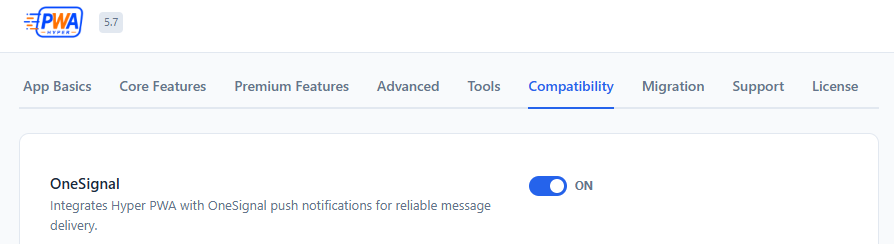
Step 3: Clear Your Site Cache
After saving the settings, make sure to clear the cache of any caching plugins you use (such as WP Rocket or LiteSpeed Cache) so the updates are delivered to your visitors immediately.
📱 How to Verify it Works
You can check if both features are active on your website:
- Open your website in a web browser.
- Verify that you still see the app installation button or banner.
- Verify that your OneSignal subscription prompt or slide-down bell appears and allows you to subscribe to notifications.
If both the install guide and the notification prompt load, your compatibility is active and working perfectly!
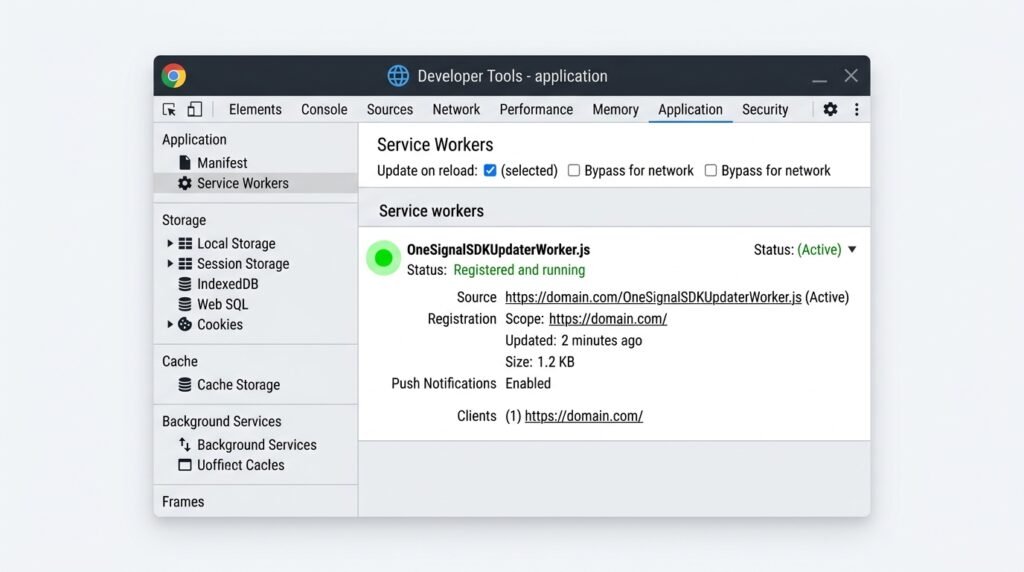
Chrome DevTools showing verified active OneSignal service worker
⚖️ Legal Disclaimer
Trademark Disclaimer
“OneSignal” is a registered trademark of OneSignal, Inc. Hyper PWA is an independent WordPress plugin developed by amanstacker. Hyper PWA is not affiliated, associated, authorized, endorsed by, or in any way officially connected with OneSignal, Inc., or any of its subsidiaries or its affiliates. The compatibility integration is provided for informational and convenience purposes only.