
How to Exclude Pages, Posts, or URLs from Caching in Hyper PWA
Hyper PWA lets you exclude specific content from being cached by the service worker. This is useful for pages that display dynamic, personalized, or frequently changing content.
For example, you may want to exclude:
- User account pages
- Login and registration pages
- Checkout and cart pages
- Membership or subscription content
- Search result pages
- Admin or preview URLs
- Pages that should always load fresh data from the server
You can configure cache exclusions from:
Hyper PWA → Core Features → Exclude from Caching
The Exclude from Caching section provides multiple ways to exclude content from the service worker cache.
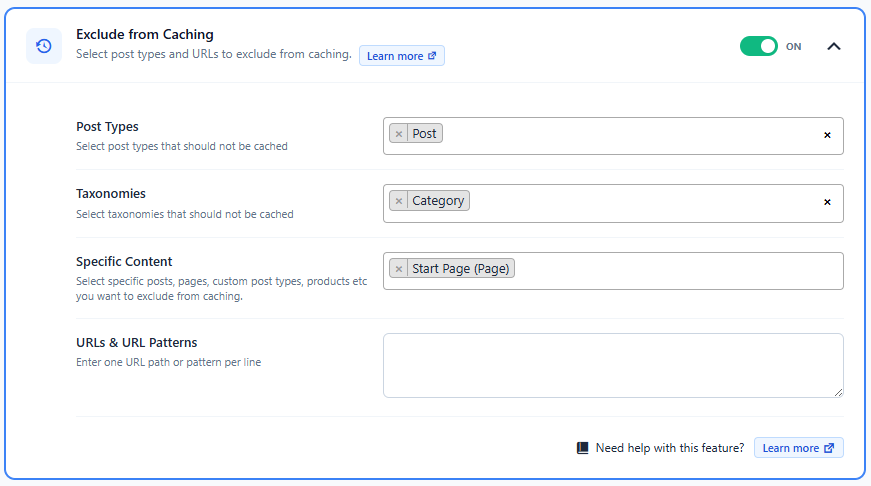
1. Exclude by Post Types
This option allows you to exclude all content belonging to one or more WordPress post types.
Examples include:
- Posts
- Pages
- Products (WooCommerce)
- Events
- Portfolio
- Downloads
- Any custom post type registered by your theme or plugins
Simply select one or more post types from the multi-select field, and Hyper PWA will automatically bypass caching for every item belonging to those post types.
Example
If you select Products, every WooCommerce product page will be excluded from caching.
2. Exclude by Taxonomies
You can also exclude content based on taxonomies.
Supported taxonomies include:
- Categories
- Tags
- Product Categories
- Product Tags
- Any custom taxonomy registered on your website
This is useful when an entire category contains frequently updated content.
Example
If you exclude the News category, all posts assigned to that category will bypass the cache.
3. Exclude Specific Content
Sometimes you only want to exclude individual pages or posts instead of an entire post type.
The Specific Content selector allows you to search and select individual content items.
Examples include:
- Home page
- Contact page
- Pricing page
- Checkout page
- My Account page
- Any individual post
- Any custom post type item
Only the selected content will be excluded from caching.
This is the recommended option when only a few pages require dynamic content.
4. Exclude URLs & URL Patterns
This option provides the most flexibility by allowing you to exclude URLs or URL patterns.
You can enter one URL or pattern per line.
Examples
/cart/
/checkout/
/my-account/
/login/
/search/
/preview/
/api/
/wp-json/
You can also exclude custom application routes or dynamic URLs used by your website.
This option is ideal for:
- Dynamic pages
- Search results
- AJAX endpoints
- API endpoints
- Membership pages
- Payment pages
- Custom application routes
Best Practices
Use cache exclusions only when necessary. Caching improves performance and offline support, so excluding too much content may reduce the benefits of your PWA.
In general:
- Exclude pages that display user-specific information.
- Exclude pages that change frequently.
- Exclude checkout, payment, and account pages.
- Exclude search and API endpoints.
- Keep public pages cached whenever possible for the best performance.
When Should You Exclude a Page?
Consider excluding content if:
- It displays different information for each visitor.
- It updates every few seconds or minutes.
- It should never be available offline.
- It contains sensitive or personalized information.
- It relies on real-time server responses.
For most blogs, business websites, portfolios, and documentation sites, only a small number of pages need to be excluded. Hyper PWA will continue caching the rest of your website to provide fast loading speeds, offline access, and an improved user experience.